
How do I manage my Smartship?Updated an hour ago
Any changes or cancellations to your autoship must be made at least 24 hours before its next scheduled processing date to ensure they take effect before your next order is processed.
How do I Edit or Cancel my monthly Smartship orders?
To cancel or edit your autoship and change your monthly orders:
- Sign into your account’s back office HERE
- Find and select the three horizontal lines (☰) in the top left corner if you need to bring up the left side panel
- Select “Smartship Setup” on the left side panel
- On the top left and right corners of this new screen, you can find the options to “Cancel Smartship” or “Edit Smartship”
- After making any edits to your Smartship, make sure to select "Save Smartship" at the bottom of the page before exiting!
Canceling Smartship?
After selecting "Cancel Smartship," you'll be asked to confirm your cancellation by clicking "Confirm you wish to delete your Smartship."
Please note: If your card declines, our system will reattempt to process your Smartship the next day or 2. If your card declines a total of 4 times, you will be automatically taken off Smartship. You'll need to add your new card and add your Smartship back on file.
How do I change the date of my next Smartship order?
To update your Smartship's next processing date or place your Smartship on an indefinite hold, follow these steps:
Log in to your account's Back Office HERE.
From the left side panel, select "Smartship Setup."
Click "Edit Smartship" in the top-left corner of the page.
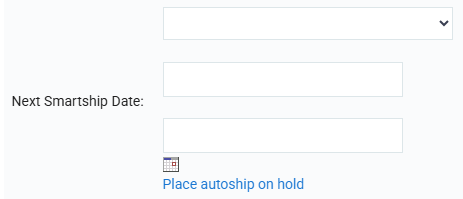
*From here, you have the option of putting your Smartship on hold by selecting "Place autoship on hold"
To change your processing date, you can either:
Use the calendar icon to open a calendar and easily select your preferred date.
Manually enter your date by typing it directly into the provided fields.
Once you've selected your new processing date, be sure to click "Save Smartship" at the bottom of the page to save your changes before exiting.
Please note: You must select a date on or before the 26th of any given month otherwise your Smartship will not be saved.